
Production
For producers: from raw material to a finished product sold by invoice or through the web shop.
From raw material to a product whose cost you know.
For companies that make what they sell: a product has a bill of materials, the production order takes the components off stock and receives the finished product at the real cost of material, labour and other costs. The product is then sold like any item, by invoice, delivery note or through the web shop.
- Bill of materials with process loss
- One click order: issue note and finished product receipt
- Lot and best-before date on the order and on the label
- You switch it on yourself, from the Standard plan
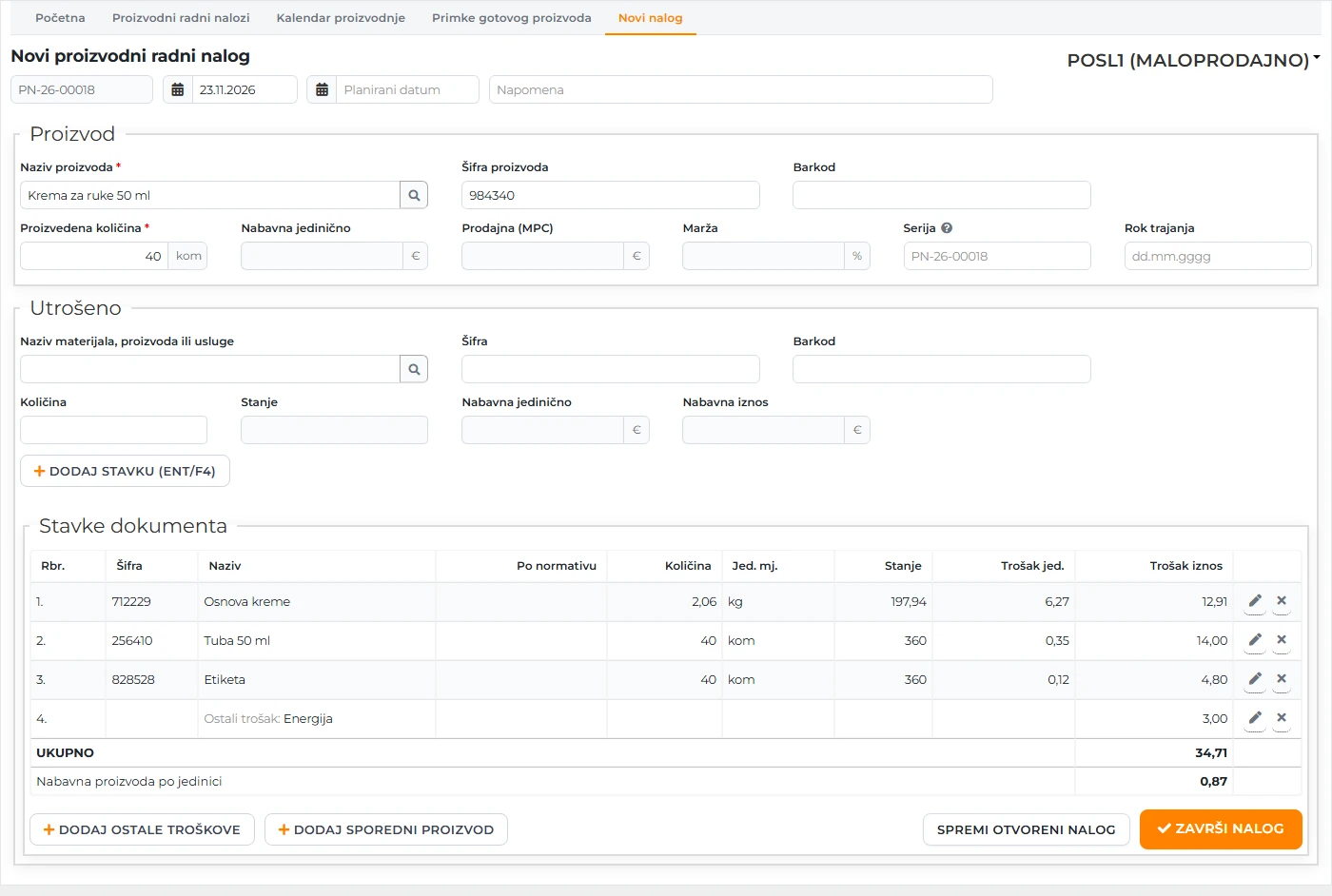
The product at its real cost, not an estimate.
You choose the product and enter the quantity, and the components come from the bill of materials. You can change what was really used, add a component that is not in the bill of materials and other costs such as energy or transport. Finishing the order posts the issue note of the components and the finished product receipt under the order number, and the product cost is the sum of material, labour and other costs.
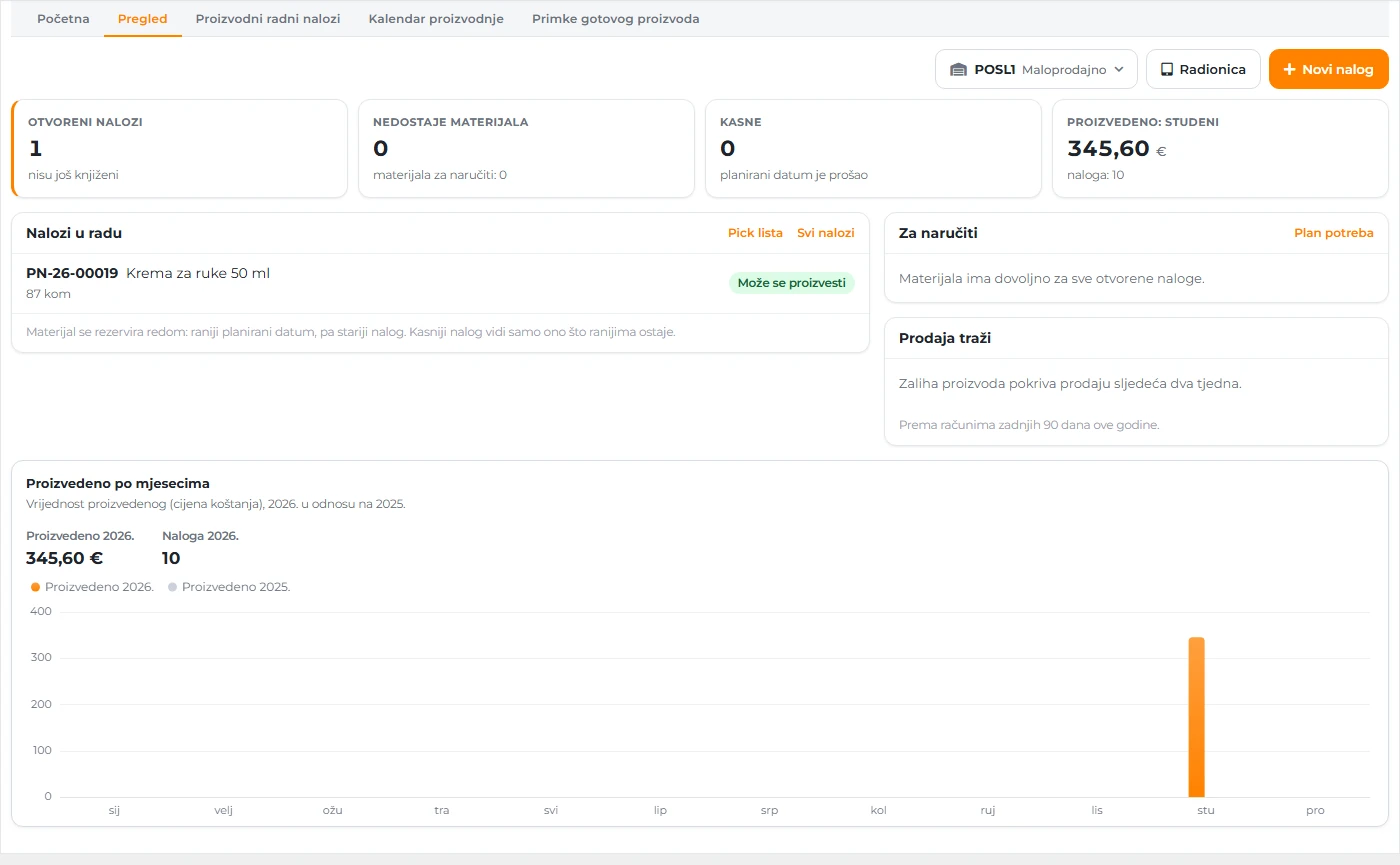
- Open order in advance, material reserved in order sequence
- Order what is missing: supplier orders in one click
- Deviation from the bill of materials on the order and in the report
- Order printout with signatures, PDF and cancellation
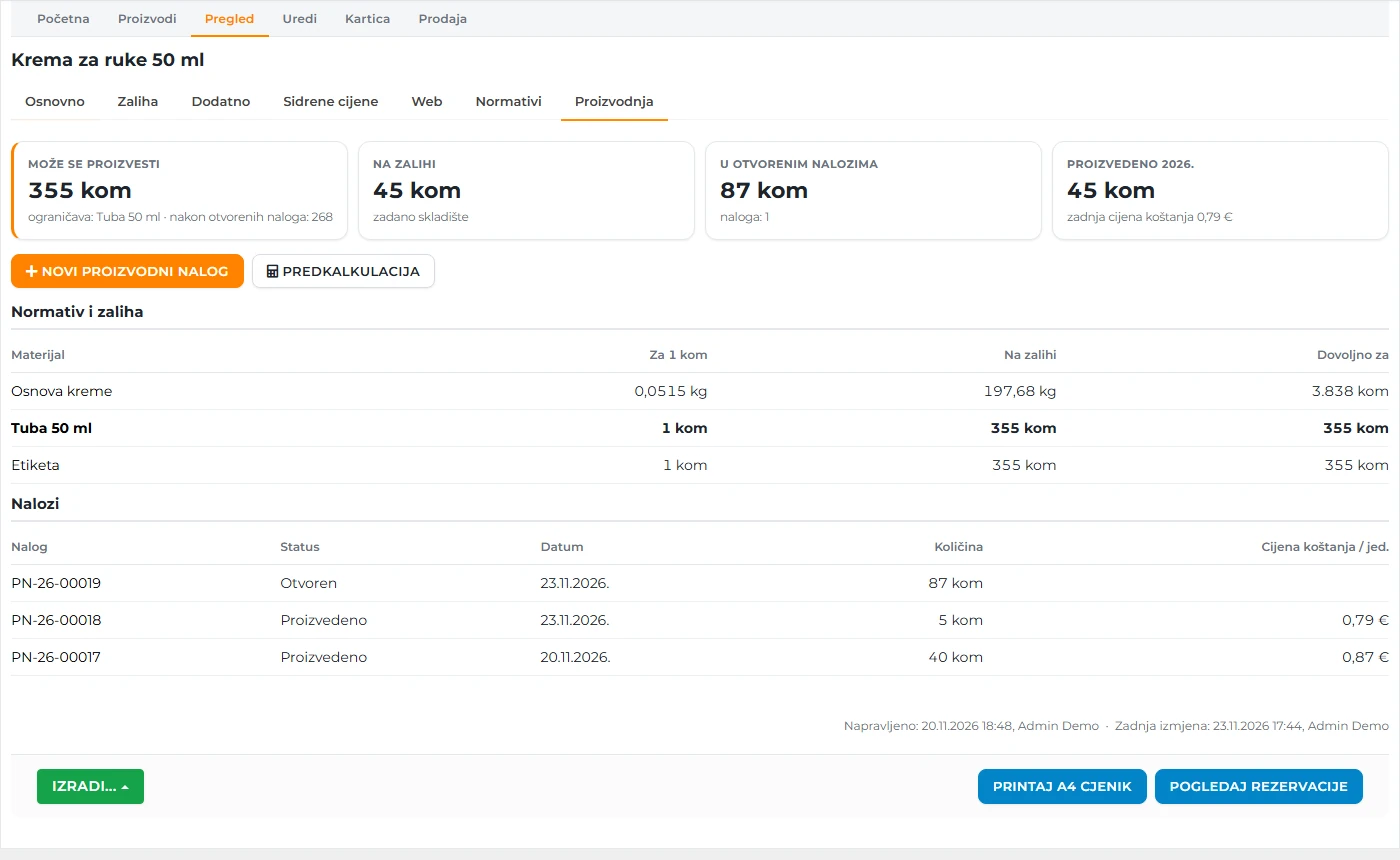
How much can I make, and what limits me.
The Production tab of a product shows how many pieces you can make with the current stock, which material limits it and what is left after the open orders. The cost estimate prints the cost from the bill of materials next to the wholesale and retail price. You can also ask the AI assistant the same in plain words.
- Cost estimate
- Material tab: where it is used, last purchases and use
- An existing item becomes a product, with all its history
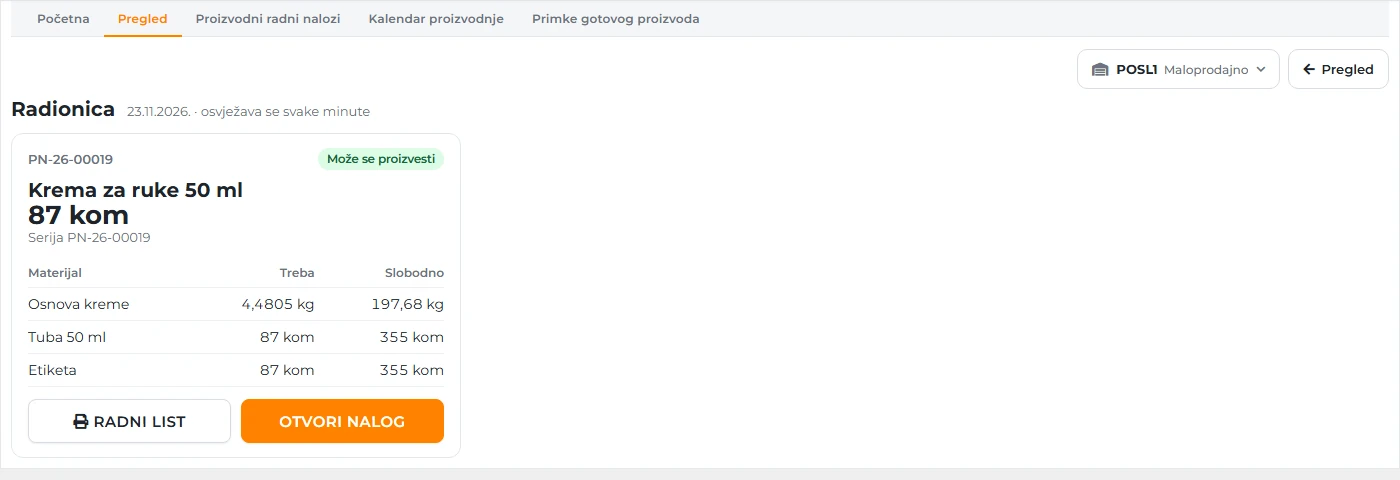
Orders on a tablet, next to the machine.
Workshop shows open orders as large cards: product and quantity, lot, whether there is material, how much is needed and how much is free. The work sheet prints the order for the workshop with empty fields for issued, returned and used, and the screen refreshes itself every minute.
- Pick list for all open orders together
- Large buttons for working with a finger
Which raw material, which product, which customer.
The lot and best-before date are entered on the order and printed on the label in every plan. In the Business plan full tracing follows the lot from the material receipt through the order to the shipment to the customer, so in a product recall you know at once who got the lot. The order uses the lot with the shortest best-before date first.
- Lot card: where it came from, where it was used, who got it
- Lots expiring in 30 or 90 days
- Lot categories and stock on a date
| Product | Shipped | Customer |
|---|---|---|
| Hand cream 50 ml | 24 | Ljekarna Primjer |
| Hand cream 50 ml | 12 | Studio Lana |
Example: which raw material a product lot was made from and which customers it went to.
Never too much material, never too little.
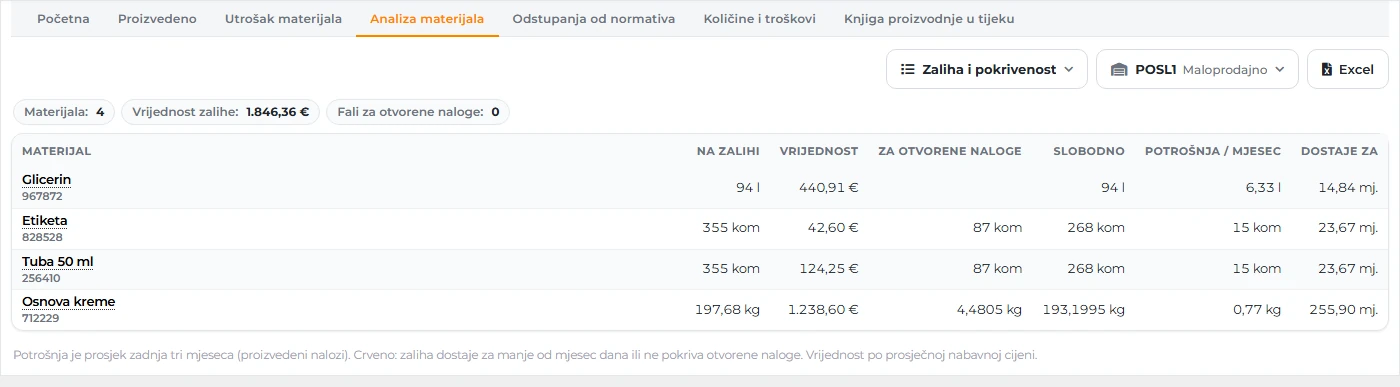
The requirements plan shows what open orders need, what is in stock and arriving and how much to order, and supplier orders are made in one click. Material analysis shows how many months the stock lasts, how the purchase price changed and what sits without movement. The Business plan adds the production calendar and order proposals from sales.
- Reports Produced, Material use and Deviations
- Every report to Excel with one button
What Production includes
- Materials and products with a bill of materials
- Production order with issue note and finished product receipt
- Product cost at real cost
- Lot, best-before date and tracing to the customer
- Production overview: open orders, whether there is material and ordering what is missing
- How much can be produced, cost estimate, work sheet and material analysis
From the Standard plan.
You switch the module on yourself, on the Modules page of the program. The Business plan adds planning, lot tracing to the customer, by-products and orders from customer orders.
| Starter | Standard | Business | Premium | |
|---|---|---|---|---|
| Materials, products and bill of materials with process loss | – | ✓ | ✓ | ✓ |
| Production order: issue note and finished product receipt | – | ✓ | ✓ | ✓ |
| Product cost at the real cost | – | ✓ | ✓ | ✓ |
| Lot and best-before date on the order and label | – | ✓ | ✓ | ✓ |
| Production overview, Workshop and Order what is missing | – | ✓ | ✓ | ✓ |
| Material requirements plan and purchase proposal | – | ✓ | ✓ | ✓ |
| Cost estimate, work sheet, pick list, material analysis | – | ✓ | ✓ | ✓ |
| Lot tracing to the customer, lot categories and stock on a date | – | – | ✓ | ✓ |
| Calendar, planned date and order proposals from sales | – | – | ✓ | ✓ |
| By-products, order from a customer order and stages | – | – | ✓ | ✓ |
Frequently asked questions
Who is Production for?
For companies that make what they sell: food, cosmetics, filling and packing, workshops, small plants. The example in the program is a hand cream, but the same path works for bread, juice, candles or furniture.
How is the product cost calculated?
The order adds up the material really used at the average purchase price, labour and other costs, and divides by the quantity produced. That cost goes onto the finished product receipt, so the margin on the invoice is right.
From which plan is Production available?
From the Standard plan (28 € a month + VAT, billed yearly). Lot tracing to the customer, the calendar, proposals from sales, by-products and orders from customer orders are part of the Business plan.
Do I have to keep lots?
No. Without one, the lot is the order number. A company switches full lot tracing on in the production settings only when it needs it.
Read more
Production software for small producers
Bill of materials, production orders and products at their real cost, with materials, warehouse, invoices and the web shop in the same software.
Related areas
Items and prices
A catalogue that follows how you really sell: piece, kilogram, metre or hour.
Warehouse and purchasing
Stock per warehouse, from the supplier order to stocktaking.
Consignment
Other people's goods with you and your goods with others, with settlement of what was sold.
Warehouse logistics
Every item has its place on the shelf and a movement history.
Anchor prices
A legal duty of retailers met from the records you already keep.
Software that more than a thousand Croatian companies already rely on.
Kigo.Cloud is made by Symmetria d.o.o. from Zagreb and BID Grupa d.o.o. from Rijeka, a team building invoicing and fiscalization software since 2013, with support in Croatian and English.







Start working in Kigo.Cloud
Signing up is free, no card needed. For questions, write to us at info@kigocloud.com.